Integrating Watercolor Flowers Clipart and Patterns into a Creative Workflow
In the toolkit of a modern creator, digital assets are not merely decorative elements; they are functional components that accelerate production and enhance consistency. A collection like this Watercolor Flowers Clipart and Patterns set exemplifies this shift from static imagery to dynamic, process-ready resources. For professionals, marketers, and hobbyists alike, integrating such a curated library into a project workflow requires understanding its structure, its compatibility with common tools, and its potential applications across different stages of a project’s lifecycle.
The Asset Library as a Foundation
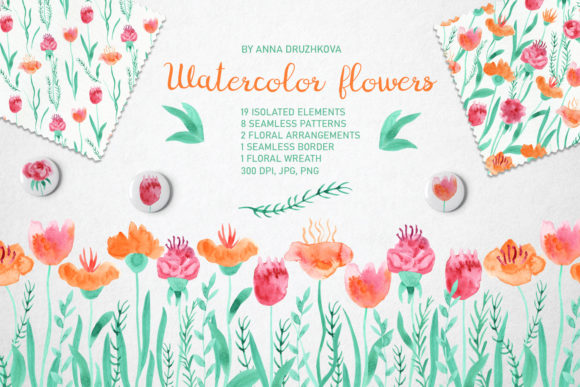
Understanding what you receive is the first step in effective integration. This collection is a comprehensive digital download containing 19 single watercolor elements—flowers and leaves—provided in both PNG and high-resolution JPG formats. Each PNG file, with its transparent background, is immediately usable for digital compositing. The accompanying PSD file, with each image on a separate layer, is a critical workflow asset. It allows for direct manipulation in Adobe Photoshop, enabling color adjustments, blending, or quick assembly without the need to manually cut out individual elements. This layer organization saves significant time during the initial design phase.
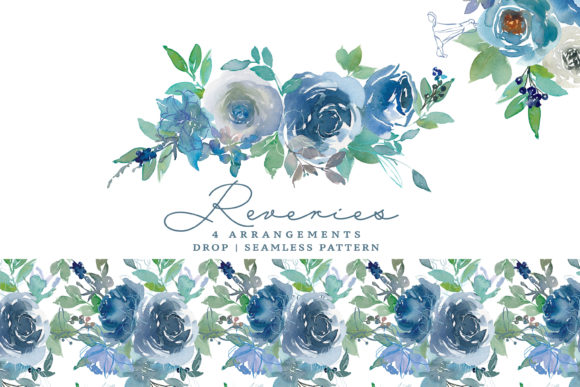
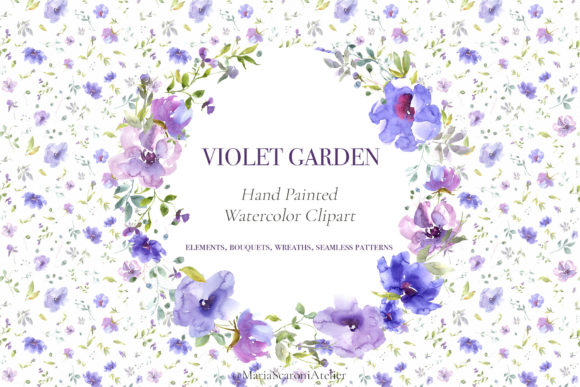
Beyond the elements, the set includes eight seamless patterns at 4000x4000 pixels. These are not just backgrounds; they are scalable textures intended for applications like fabric design, custom wrapping paper, or website backgrounds. Their high resolution ensures quality across both print and digital mediums. The premade compositions—two flower arrangements, a wreath, and a seamless border—serve a different function. They are ready-made solutions for when you need a polished visual centerpiece quickly, such as for a social media banner, a greeting card, or a presentation slide. Having these on hand transforms a phase of a project from a creation task to a selection and adaptation task.
Preparation and Organization in Your Workflow
Before a project begins, the preparatory integration of assets like this Watercolor Flowers Clipart and Patterns set is key. Downloading and organizing the ZIP file's contents into a logical folder structure on your computer or cloud storage is a fundamental step. Consider separating the folders by asset type: Single Elements, Patterns, Premade Compositions. For team projects or frequent use, uploading these assets to a shared brand asset library on platforms like Dropbox or Google Drive ensures consistency and accessibility for all collaborators.
Compatibility is a core consideration. The file formats provided—PNG, JPG, PSD—are industry standards. PNGs with transparency are directly importable into software like Adobe Illustrator, Canva, Procreate, Affinity Designer, and most video editing suites. The JPGs, at 300 DPI, are optimized for print-ready layouts in programs like InDesign or Microsoft Publisher. The single PSD file’s layered structure interacts seamlessly with Photoshop-centric workflows, allowing designers to drag and drop elements directly into other compositions or modify them in context. This broad compatibility means the collection can be inserted into diverse workflows without format conversion headaches.
Application During the Design and Execution Phase
During the active execution of a project, these assets shift from being stored items to active tools. For a small business owner creating a spring marketing campaign, the process might involve selecting a premade wreath composition for the main promotional email header, using a seamless pattern for the background of a webpage, and pulling individual leaf elements from the PSD file to create custom icons for a sale announcement. The efficiency gain is twofold: it eliminates the need to create these base elements from scratch, and it guarantees a cohesive visual style across all materials.
For a blogger or educator designing a worksheet or an eBook cover, the single elements offer flexibility. You can build a custom floral border by repeating and arranging individual flowers from the PNG set, a task made easier by the transparent backgrounds. The provided seamless border is an alternative for when time is limited. This interaction between custom assembly and ready-made solutions allows you to adapt your process based on the project's time constraints and creative requirements. The high-quality 300 DPI resolution ensures that even if you scale an element up for a large format print, the watercolor texture remains crisp, addressing quality control at the output stage.
Long-Term Use and Brand Consistency
For entrepreneurs and freelancers building a brand, a consistent visual identity is paramount. Integrating a cohesive asset library like this Watercolor Flowers Clipart and Patterns collection into your long-term resource pool helps establish that consistency. By using the same floral elements and patterns across your website, product packaging, and social media graphics, you create a recognizable aesthetic. The set acts as a visual anchor. Over time, as you undertake new projects—from designing linen patterns for a side business to creating wrapping paper for a product—you can return to this same set, ensuring that new outputs harmonize with your existing brand materials.
Moreover, the collection supports iterative design. A marketer might use the watercolor wreath for a holiday campaign one year, and the following year, deconstruct it by using elements from the layered PSD file to create a new, updated version. This capacity for adaptation makes the set a sustainable investment, not a one-use resource. Organization plays a role here again; maintaining a well-indexed library of your most-used assets, including these watercolor files, streamlines the initiation of any new project.
Practical Implementation Tips for Various Users
The application of this clipart and pattern set varies by role. A hobbyist creating custom wedding invitations might use the seamless border as a ready-made frame, then layer individual flower PNGs over text for accent. A publisher designing a book interior could use the subtle patterns as chapter background textures. For a productivity-minded user, the key is to integrate the assets into templated systems. For instance, you could pre-make a set of Canva templates using the provided JPG patterns as backgrounds and the PNG wreath as a logo placeholder. This turns the creative assets into a repeatable production system.
When working with other tools, remember that the transparent PNGs are ideal for layering over photographs or textured backgrounds in presentation software like PowerPoint or Keynote. The large pattern files (4000x4000px) can be cropped to fit specific areas without loss of detail, making them versatile for both full-background use and small accent areas. A practical observation is to always check the final output medium: for web use, you may downsample the JPGs to optimize loading speed, while for print, you keep the full 300 DPI resolution.
Seamless Integration from Concept to Output
The ultimate value of a well-structured digital asset collection lies in its ability to move seamlessly from concept to final output. The Watercolor Flowers Clipart and Patterns set, with its division into single elements, patterns, and compositions, directly supports this journey. In the conceptual phase, you browse the premade compositions for inspiration. During the drafting phase, you experiment with the layered PSD file or assemble single elements. In the execution phase, you apply the chosen assets to your layouts. Finally, in the quality control phase, the high-resolution standards ensure your outputs are professional.
By viewing these assets not as mere pictures but as modular components for your workflow, you transform your creative process. You reduce time spent on foundational design tasks, increase visual consistency across projects, and open up possibilities for application in unexpected areas—from custom fabric designs to unique digital presentations. The integration is straightforward: organize the files, understand their formats, and map their potential uses to your common tasks. This approach turns a downloadable ZIP file into a persistent and powerful tool in your creative, educational, or professional routine.