Discovering Poppies Line Art PNG and Poppies EPS: A Digital Asset for Modern Creatives
In the landscape of digital design, efficiency and flexibility are paramount. For professionals, creators, and small business owners navigating projects ranging from wedding invitations to brand marketing, the right starting asset can streamline entire workflows. This is where a well-prepared set of botanical line art becomes not just a decorative element, but a foundational tool. Specifically, a package containing Poppies Line Art PNG and Poppies EPS files offers a structured, versatile resource designed for immediate integration into your creative process. Understanding what this asset is and how it functions within a broader project lifecycle is the first step toward leveraging its full potential.
What Poppies Line Art PNG and Poppies EPS Files Actually Provide
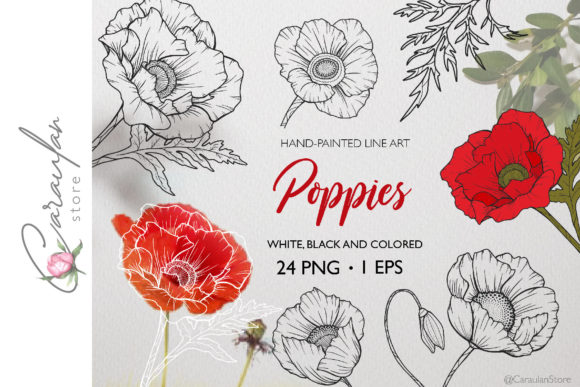
At its core, this package is a curated collection of hand-drawn poppy illustrations delivered in multiple file formats, each serving a distinct purpose. You receive a ZIP archive containing three separate folders of PNG images: one for black line art, one for white, and one for pre-colored versions. Each folder houses eight individual files, offering a variety of poppy compositions—from single blooms to clusters. Crucially, you also receive a single EPS10 vector file containing all the elements together. This structure isn't arbitrary; it's engineered for practical application. The PNGs, with their transparent backgrounds, are ready for drag-and-drop use in software like Canva, PowerPoint, or basic image editors, ideal for quick placements. The EPS vector file is the powerhouse, compatible with professional applications like Adobe Illustrator, Affinity Designer, or CorelDRAW, where you can infinitely scale, edit strokes, recolor, and deconstruct the artwork without quality loss.
Where This Asset Fits in Your Project Timeline
The utility of Poppies Line Art PNG and Poppies EPS spans the entire arc of a project. In the preparation and planning phase, these files act as a visual catalyst. A blogger sketching a post about garden themes or a marketer brainstorming a spring campaign can drop the PNGs into a mood board or draft layout instantly, providing concrete visual direction that shapes subsequent decisions. This early visualization saves time compared to searching through disparate, unlicensed stock imagery.
During the active execution and design phase, the different file formats interact directly with your chosen tools and methods. For a freelance designer creating wedding stationery, the white PNGs might be layered over a dark background for elegant contrast. Meanwhile, a small business owner crafting a logo for a natural products brand would open the EPS file in Illustrator, using the vector paths to extract a single petal shape, modify its line weight to match other brand elements, and integrate it seamlessly into a larger logo design. The separation into color-specific PNG folders aids in organization, preventing the common clutter of mixed assets and ensuring a smooth, efficient workflow.
Integration with Tools, Platforms, and Collaborative Workflows
True efficiency is realized when an asset seamlessly interacts with your existing ecosystem. The Poppies Line Art PNG files are inherently compatible with almost any platform that accepts image uploads. Educators can import them into digital worksheets or online course materials; hobbyists can use them in digital scrapbooking apps. Their transparent background is a key feature for usability, eliminating the need for complex cropping and ensuring clean overlays on any colored background.
The included EPS vector file speaks to a more professional and scalable workflow. In vector software, these illustrations become dynamic components. You can ungroup elements, change colors globally using swatches, or even convert lines into brushes for further use. This interacts profoundly with decisions about brand consistency. If you're developing a series of materials—a website banner, a brochure, and social media graphics—using the same vector base ensures identical line quality and style across all outputs, a fundamental aspect of quality control. Furthermore, if collaborating with a printer for physical wedding invites or merchandise, providing the high-resolution, scalable EPS file ensures print-ready results without last-minute resolution issues.
Practical Implementation: Workflow Examples and Tips
Consider a practical scenario: an entrepreneur launching a boutique tea brand. Their process might begin by using the black PNGs in a simple website mockup created in a web design tool. Once the aesthetic is approved, they transition to the EPS file in Illustrator to create the final logo, packaging labels, and iconography for product categories. By working from the same vector source, they maintain perfect consistency. A tip for long-term use: once edited in vector form, save your modified versions (e.g., a monochrome version for legal documents, a full-color version for marketing) as new, organized project files. This turns the initial purchase into a lasting, adaptable brand asset library.
For a content creator or blogger focused on productivity, these files can expedite regular output. Storing the PNG folder in a dedicated "Graphics" directory on your computer allows for quick access. You could establish a template for blog post headers where you simply swap in different floral PNGs, creating visual variety while adhering to a efficient, repeatable process. The eight variations per color provide enough choice to avoid monotony without requiring you to source new art for each project.
Factors of Preparation, Organization, and Long-Term Value
Integrating any new asset smoothly requires a consideration of preparation. Before even downloading the ZIP, assess your typical software and project types. Do you primarily work in quick, raster-based environments? Then the PNG folders will be your go-to. Do you require artwork for large-scale prints or iterative brand development? Then the EPS file is your essential component. Upon receipt, immediately unzip and organize the folders into your existing digital asset management structure. This simple act of filing—perhaps under "Floral Assets / Poppies"—prevents the asset from becoming lost and forgotten, ensuring it's ready when needed.
The design of the package itself aids in usability. The separation into BLACK, WHITE, and FULL color PNGs addresses common design needs directly: overlay on dark backgrounds, overlay on light backgrounds, and ready-made colored accents. This thoughtful organization reduces the friction of manual color inversion or filling later. For long-term use, the vector EPS format is the most valuable. Unlike raster PNGs, which have fixed resolution, the vector art remains future-proof. Whether you need to create a small icon today or a large wall mural five years from now, the EPS file can scale flawlessly, protecting your initial investment and supporting evolving project scopes.
Ultimately, Poppies Line Art PNG and Poppies EPS represent more than just pretty flowers. They are a structured digital resource built for implementation. By fitting into the early planning stages, interacting deeply with professional design tools during execution, and offering scalable longevity, they serve a practical purpose in the workflows of modern creatives. From the wedding planner designing clipart for invitations to the educator crafting botanical learning materials, the key is to see these files not as a final product, but as a versatile, editable starting point—one that you can mold, adapt, and integrate to bring efficiency, consistency, and beauty to your unique creative and professional processes.